Casual to fine dining · reservations + courses · MENA-built
tawlat is the dining operating system: hostess board at the door, waiter terminal on the floor, course-based KDS in the kitchen, fast cashier at the till, every table, every tab, every course on one live screen. Designed for the rhythm of a real Arabic dining service.
Reservations + waitlistCourse-based serviceBill split, three modesEN + AR everywhere
Most restaurant POS were designed for fast food, counter ticket, settle, gone. Dining is different: courses fire in order, parties stay 90 minutes, bills split four ways, the hostess holds tables, the manager gates the discounts. tawlat is shaped around that reality, not retrofitted.
Course-based firing
Send the starters now, hold the mains, fire the dessert when the table is ready. The KDS receives courses as separate tickets, no big bang, no chaos at the pass.
Reservations + walk-ins
Hostess board with reservations, waitlist, and floor in one view, every booking links to a customer record. No paper book, no double entry between phone and door.
Bill rituals built in
Three split modes, by item, even share, custom amount. Tax + service rebalance correctly. Tab-level discounts are manager-PIN gated. The math always reconciles.
Manager controls
Discounts, voids, removed items, refunds, gated behind a manager PIN, fully audited. Every override leaves a name and a reason in the audit log.
The screens you'll actually use
Four workstations. One live system.
Dining doesn't need ten interfaces. It needs a hostess at the door, a tablet on the floor, a screen at the pass, and a register at the till. tawlat ships exactly those four, and they all read from the same live data.
Workstation
Hostess
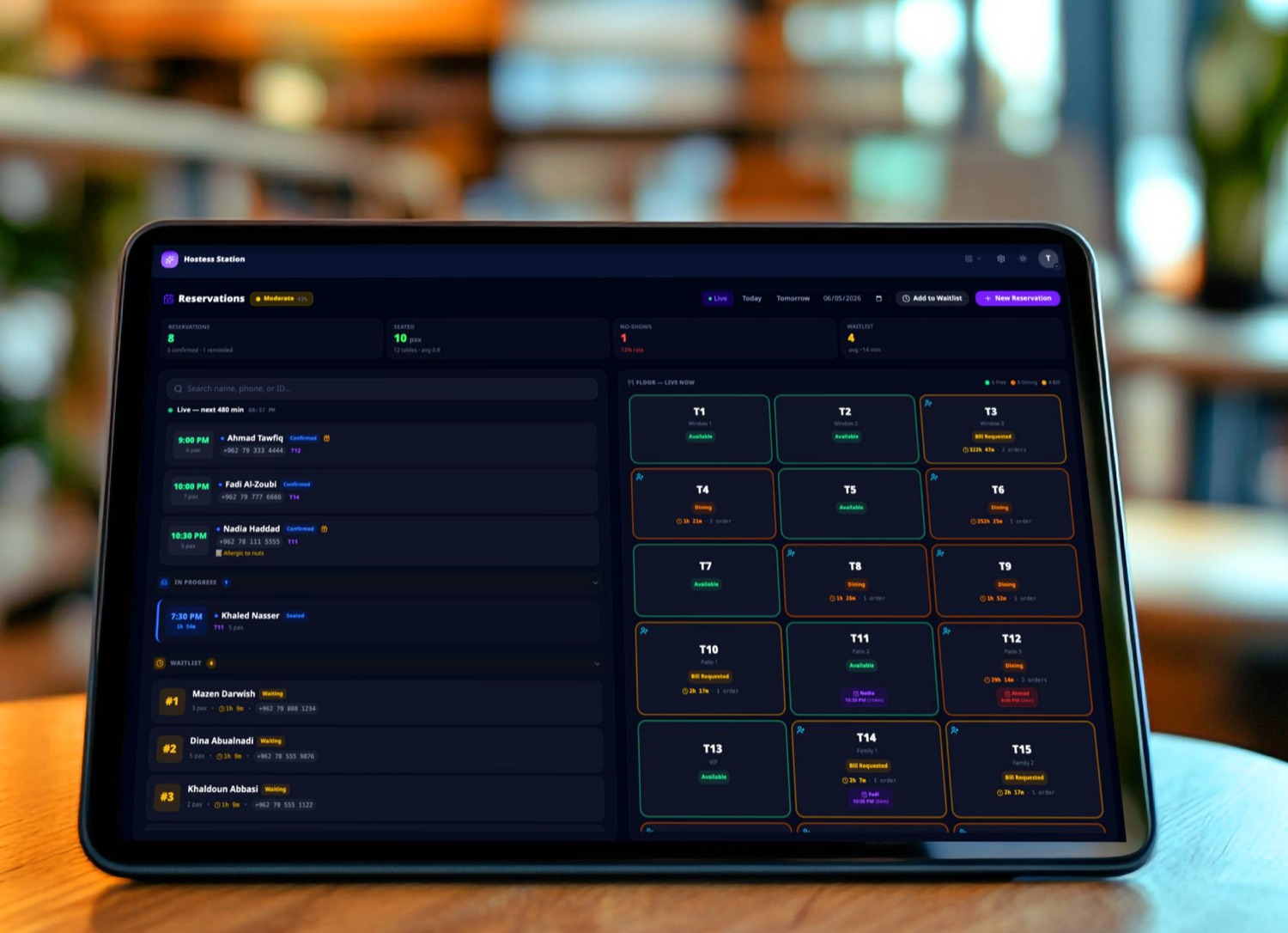
An iPad on the podium showing tonight's reservations, the walk-in waitlist, and the floor itself. Seat by name, by walk-in, or off the waitlist, same single tap.
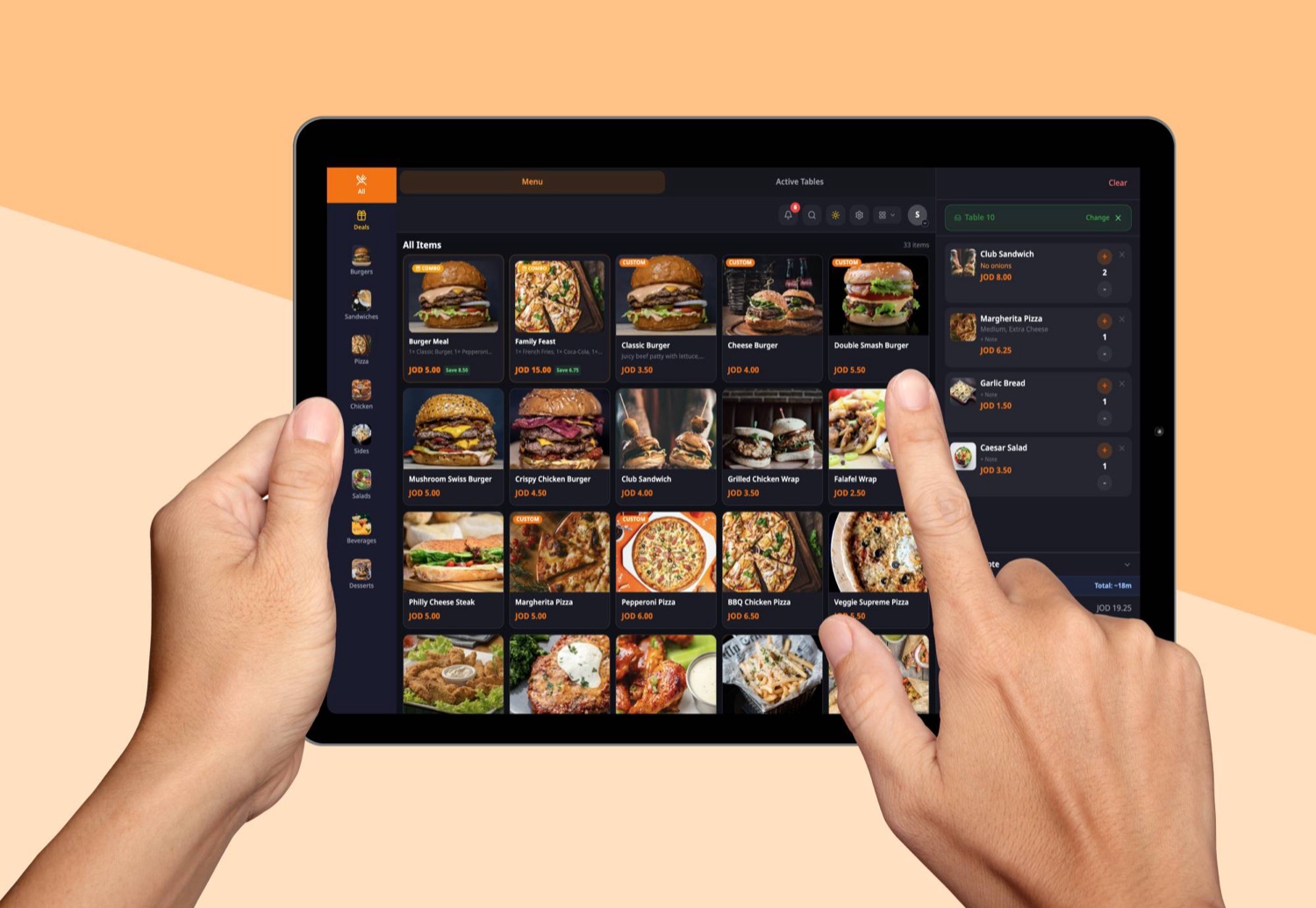
The tablet your floor staff carries. Open tabs, fire courses in order, ring the customer, split the bill, send to cashier, all in two-tap motions. Works on any modern Android tablet.
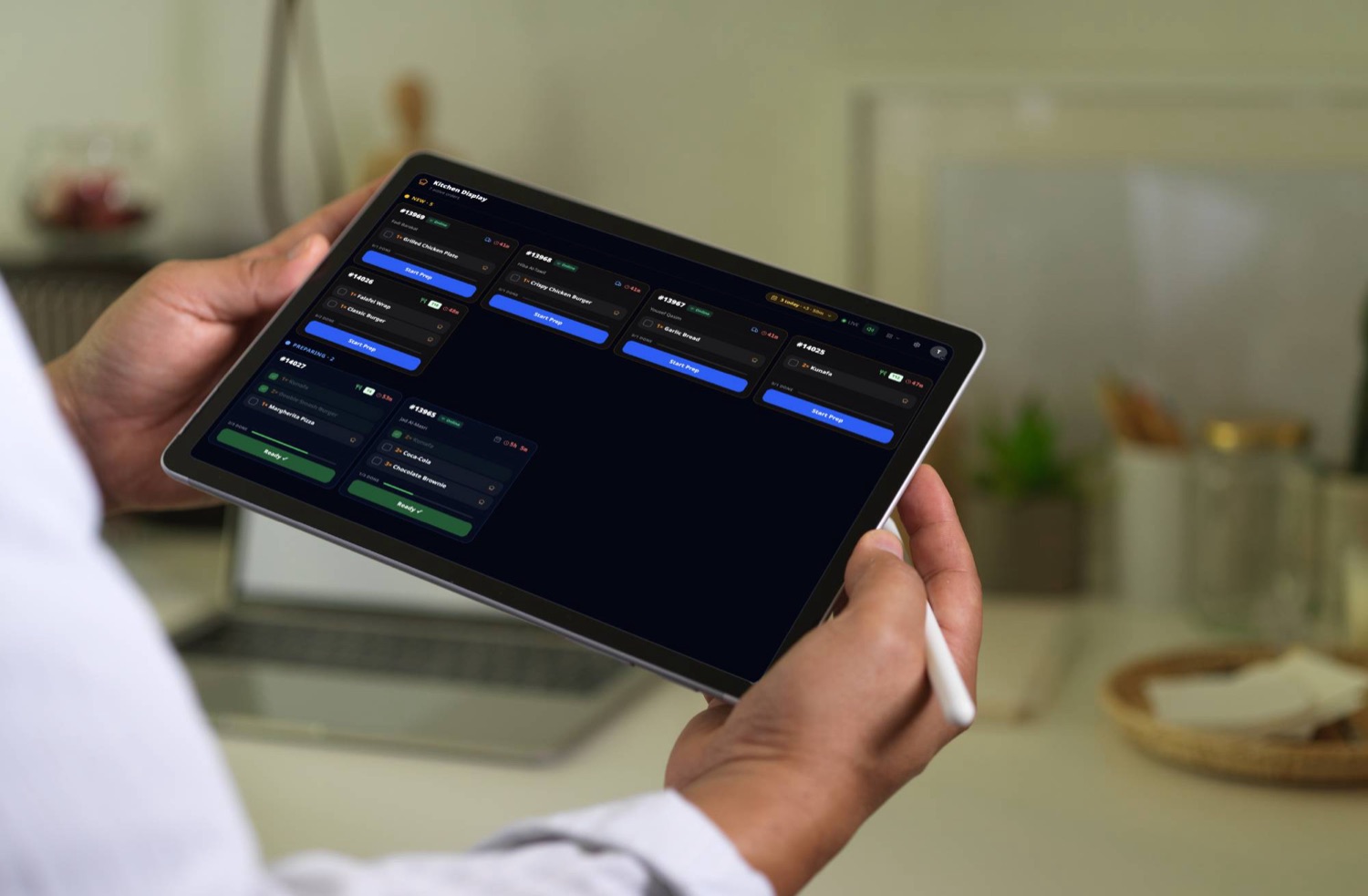
The KDS screen at the pass. Courses fire as separate tickets, color-coded urgency, auto-bump after timer, allergen tags surface in red. No paper, no shouting, no missed modifications.
Per-station rails, hot, cold, pastry, bar
Course-aware tickets, starters before mains
Allergen tags + special requests in red at the top
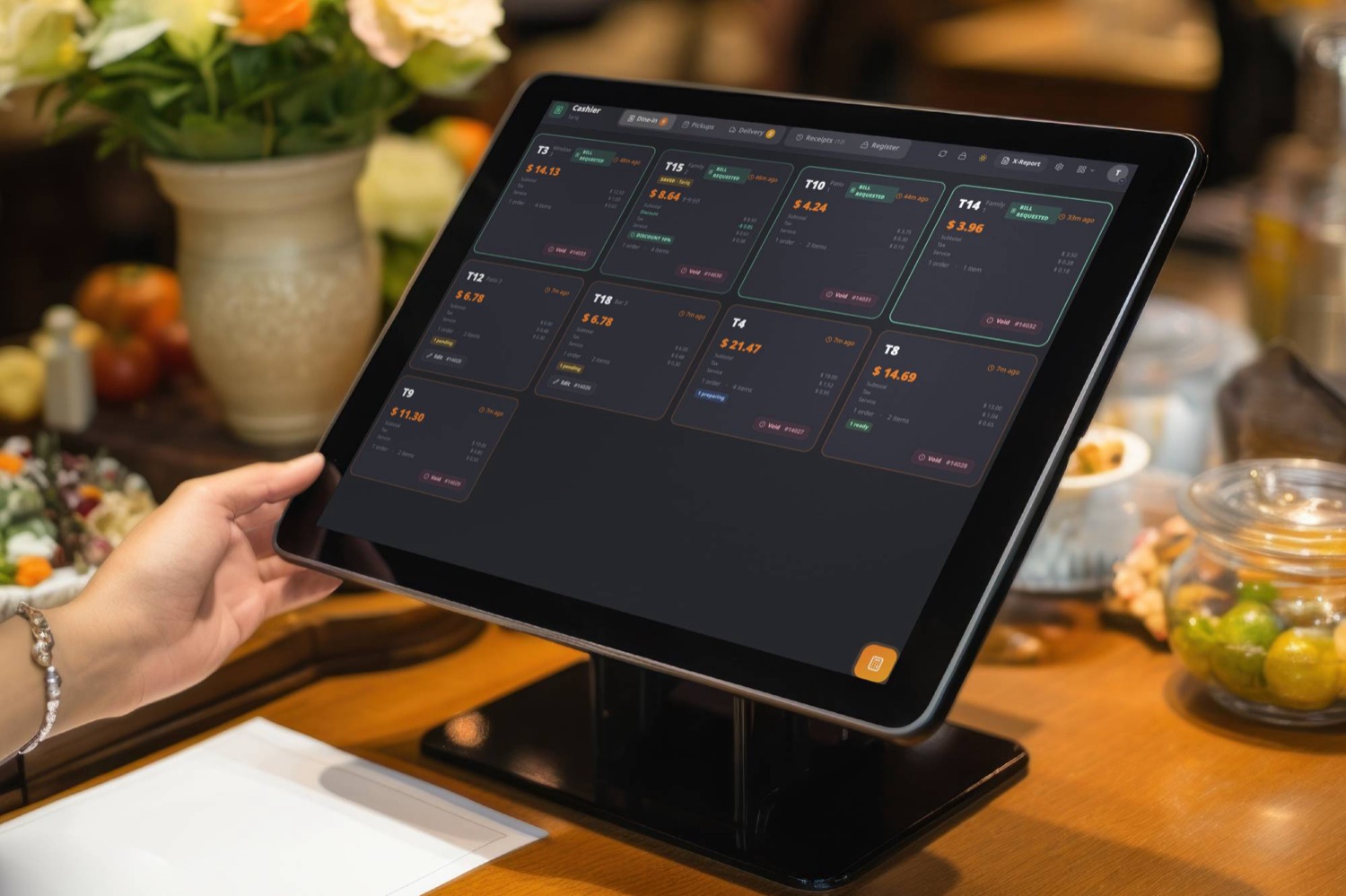
The till screen. Cash, card, CliQ, or wallet, one screen, three taps to close. Bill split sheet for dining tabs. Manager-PIN on discounts and voids. Z-report on close.
A dining service starts at the door. tawlat's hostess workstation puts reservations, the walk-in waitlist, and the floor map on one iPad, every row links to a customer record so the regular gets recognised before they finish saying their name.
Reservation rail
Today's bookings, ordered by arrival time. Statuses move forward as guests confirm, arrive, sit, finish, no manual ticking, no paper book.
Walk-in waitlist
The walk-in queue with a live wait timer per party. Tap to notify when the table is ready, the timer stops, the status flips.
Floor map
Every table colour-coded by status, open, seated, clearing, held. Tap a table to seat the next party, same single tap as a reservation.
Customer recall
Visit count, no-show history, last cover total, dietary notes, tags, all loaded the moment the row is tapped, ready for the waiter.
The bill is the most public part of the service. tawlat ships the three rituals dining floors actually need: a clean split, a transparent service charge, and manager-gated discounts that leave an audit trail.
Split, three modes
Per-item assignment, even-share by N, or custom amounts per guest. Tax and service rebalance correctly across every check. Same screen, three modes.
Service charge, transparent
Service charge sits on the discounted subtotal per JO/GCC VAT law. Customer receipt shows it as a line, never inflated, never hidden.
Manager-PIN gates
Tab-level discounts, voided items, refunds, every override gated behind a manager PIN, with the manager's name + reason written to the audit log.
Comped courses
Mark a comped item from the waiter terminal, manager auth required, comp reason captured, customer receipt prints clean. The kitchen still sees it.
The small things that make a service run
The details a generic POS forgets.
Dining lives in the details, bilingual receipts, allergen tags the kitchen actually reads, sales targets per section, customer notes that follow the guest, course timers that respect the pace.
EN + AR everywhere
Every menu item has both names. Every receipt prints both. Reservations, customer notes, kitchen tickets, all bilingual where it matters.
Scheduled menu items
Hide the lunch-only set after 15:00. Show the wine list after 18:00. Set it once, the system enforces it across every channel.
Allergen tags + notes
Mark allergens per item, capture allergies on the customer record, surface them red on the kitchen ticket, the request never reaches the plate.
Inventory + recipes
Recipes deduct on every sale, low-stock alerts fire before the wine runs out, FEFO tracks dated stock. Cost-of-sale flows into the daily report automatically.
Sales targets per section
Set a target for the bar, the patio, the main floor. tawlat ticks toward it live and cheers when each section hits. Friendly competition built in.
Customer history
Every visit links to the guest's record, total visits, last cover, average spend, no-show count, dietary notes. Loaded with the reservation, visible to the waiter.
Your numbers, every morning
Honest reports for managers and owners.
Owners want to know covers, sales, average ticket, peak hour, and tax. Managers want section breakdown, void/comp rates, and sales-target hit. tawlat lays them out clearly on the dashboard and emails a summary every morning to the addresses you choose.
Dailysummary on the dashboard the moment you open admin
Inboxmorning + weekly email digest (opt-in addon)
Livecovers, sales, top items, peak hours, all real-time
Auditevery void, comp, refund logged with name + reason
Last night at a glanceFriday service · 18:00. 23:30
Covers127+9%
Sales3,840+14%
Avg ticket30.24
Peak hour20:30. 21:30
Service charge192.00
Tax (VAT 8%)284.00
Tomorrow morning · in your inbox
Pricing tailored to dining
Pay for the addons your service actually needs.
tawlat charges a small monthly per workstation, then you flip on only the addons your dining service uses. Most dining customers run hostess + 2 terminals + KDS + cashier, with Bill Split and Hostess Suite as core addons.
Most dining restaurants we onboard come from Foodics, Micros, a local ERP, or a paper-and-Excel hybrid. Our migration plan is built around real Jordanian dining floors, we move the menu, the customer list, and tonight's reservations in one short session.
Menu, modifiers, photos, customer list, tonight's reservations, moved in one short window. We handle the import, you sit beside us.
Zero double-entry
Open tabs and tonight's bookings transfer the night of the cutover, your floor doesn't lose a single ticket or reservation.
Free training
Hostess + waiters + cashier get a 90-minute onboarding session, bilingual, in your dining room, on your real menu.
Dining FAQ
Questions dining owners actually ask.
Reservations, courses, splits, manager controls, payments, hardware, internet, answered straight, no marketing waffle. If your question isn't here, send us a note and we'll add it.
Does tawlat handle reservations, walk-ins and waitlist together?
Yes. The hostess workstation is a 3-rail board: today's reservations, the walk-in waitlist, and the live floor map, all on one iPad at the podium. Reservations come in by phone (via the Call Bridge addon) or online; walk-ins land on the waitlist; both seat with the same single tap.
Can the kitchen receive courses separately, not all at once?
Yes, that's the default. The waiter fires starters, then mains, then dessert as separate tickets. The KDS receives each course as its own ticket with its own timer. No big bang, no chaos at the pass.
How does bill split work for dining tables?
Three modes from the same screen. By item: tap each line onto the right guest, shareables split across two or more. Even share: total ÷ N, tax + service ride along automatically. Custom amount: hand-enter exact amounts, the remainder lands on the last check. Tax + service rebalance correctly across every check, every time.
Are discounts and voids manager-controlled?
Yes. Tab-level discounts, voided items, comped courses, and refunds are all gated behind a manager PIN. Every override writes the manager's name + reason to the audit log. The cashier role's own discount limit is configurable in admin.
How is service charge handled?
Service charge is computed on the discounted subtotal, same rule as tax, per Jordan/GCC VAT law. The customer receipt shows it as a separate line; the cashier card and admin reports separate it from tax. Service rate is set in admin and can be toggled per channel if needed.
Which payment methods does tawlat support?
Cash, credit/debit card (any terminal, we don't lock you into a processor), CliQ via QR, and a generic "Other / wallet" option for new methods. Every method appears on the cashier screen; the manager-PIN gate covers refunds and special closes.
Does tawlat work for fine dining, or just casual?
Both. The course-based KDS, allergen tagging, customer history, sales targets per section, and audit trails are exactly what fine dining needs. Casual restaurants use a subset; fine dining uses the lot. Same software, configured to your service style.
What does it cost?
A simple monthly subscription for the whole restaurant (not per workstation, terminal, or user), plus the addons your dining service actually flips on (Bill Split, Hostess Suite, Call Bridge, Inventory, etc.). Pricing is published on /pricing, no hidden fees, no long-term contract — monthly with no contract or yearly for 15% off, cancel anytime. Free hands-on migration in 2 to 7 days. Local support in EN + AR included.
Run your dining service on tawlat
Less paper. Less chasing. Better service.
Book a 30-minute demo with our Amman team. We'll walk through the four workstations, set up a starter menu in your restaurant's branding, and answer the questions that aren't on this page.